
Gamepan



Description
Feature List
- A workspace for every game: unlimited tabs and a free-form canvas, arranged your way
- 24 modules: checklists, maps, trackers, tables, timers, notes, crafting, skill trees, and more
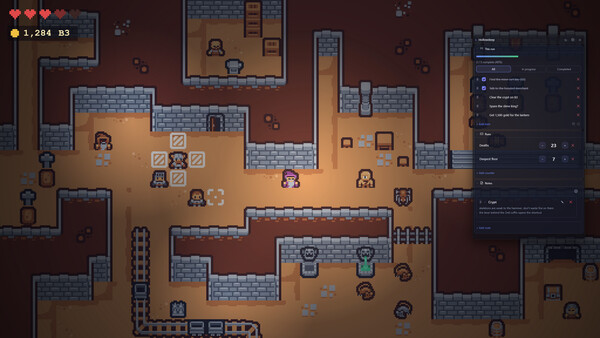
- In-game overlay that opens when your game starts
- Steam Workshop: share whole workspaces, single modules and map sets, and import what others make
- 100% local and private: no ads, no subscriptions, no accounts, no tracking
- Steam Deck ready, with Steam Cloud sync across Windows, Linux and Deck
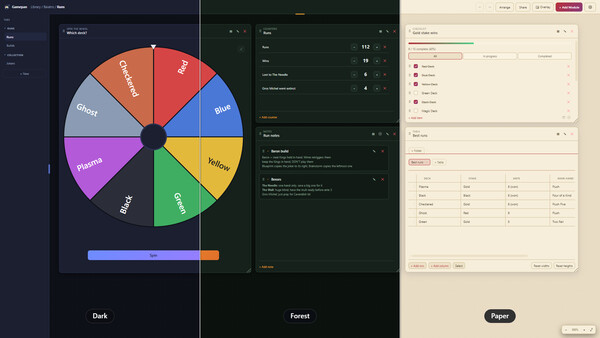
- Themes, custom colors and reusable templates
- Automatic version-history backups
- One-time purchase: buy it once, it's yours
About the Software
Every game you play deserves a better companion than a dozen browser tabs.
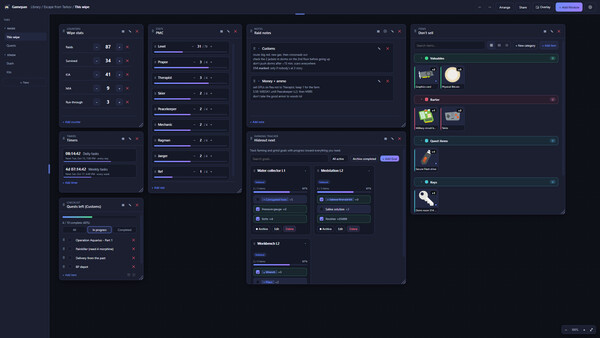
Gamepan is a companion app for every game you play. Give each game its own workspace, then fill it with exactly the tools you need: a checklist for quests, a map with your own pins, a tracker for the grind, a timer for resets, a notepad for that one boss strategy. Drag them anywhere on a free-form canvas, size them how you like, or hit Arrange and let Gamepan lay them out for you.No ads interrupting you. No subscription draining your wallet every month. No account to make, no login to forget. You buy it once, it runs on your PC, and everything you make stays on your machine.
One workspace, every game
Build a layout that fits how you play, with unlimited tabs and modules, grouped into collapsible categories to keep big setups tidy. Whether it's an extraction shooter, a roguelike, a sprawling RPG, an MMO grind or a cozy farming sim, Gamepan adapts to the game, not the other way around.And it isn't just for video games. It's great for tabletop RPGs, too. Keep your campaign map, NPCs, loot, quest log and session journal in one place, then pull them up at the table on a phone or tablet with view-only sharing.
24 modules, mix and match
Drop in exactly what a game needs:- Checklist and Kanban board: quests, dailies, achievement hunts and long-term goals
- Farming Tracker: grind goals with checklist progress toward what you need
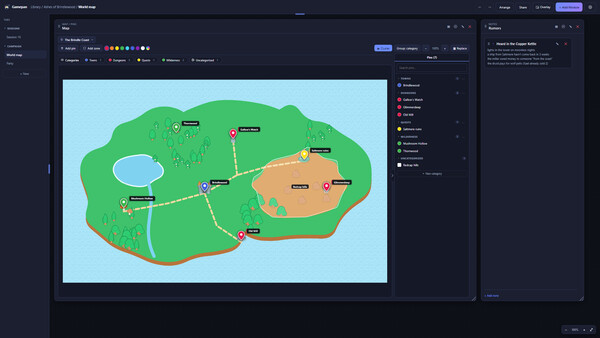
- Map / Pins: your own map images with pins, zones, categories and labels, from a small sketch to a huge world map
- Items, Builds and Collection: a catalog of your gear, loadouts with item links, and completion tracking
- Crafting Calculator: pick what to make and get the raw-material list, the in-between crafts and the total cost
- Table, Stats and Counters: gear, mats, NPCs, currency, deaths, runs, anything with a number
- Timers and Calendar: resets, respawns and raid nights, with alerts
- Skill Tree: plan talent and tech trees with prerequisites and a point budget
- Notes and Session journal: rich text, images, and a running diary of your sessions
- Dashboard and Activity Log: a live overview of everything, and a history of your changes
- Spin the wheel, Dice roller and Coin flip: let fate pick your next run, build or challenge
- Whiteboard, Gallery and Links: annotate screenshots, keep albums, and save your wikis and guides
Maps that are actually yours
Upload any map image and make it useful: drop pins, draw zones, sort everything into color-coded categories, and filter what you see. Labels stay readable as you zoom, and big maps stay smooth. Use it for extraction routes, hidden collectibles, a dungeon you're mapping by hand, or the world of your D&D campaign.A companion that shows up
A floating overlay keeps your modules on top of your game, live and interactive, so you can tick off a quest or check a map without alt-tabbing. Set its opacity, pick which modules it shows, and let Gamepan auto-detect when a game you've set up starts and open its overlay for you.Share it on the Steam Workshop
Built something good? Put it on the Workshop and let other players use it. Publish a whole workspace, a single module or a map set, then browse, subscribe and import what everyone else has made, all without leaving the app. Publishing stays Private until you choose otherwise, and imported items go through a one-click safety review, so nothing loads unseen.Yours, and private
Gamepan is local-first. It has no account system and no tracking of any kind. Your workspaces live on your PC as plain files you fully control, so you can export them, back them up or wipe them anytime.Sharing setups is safe, too. When you import a workspace from someone else, its images and links stay hidden behind a one-click review, so nothing unexpected loads until you say so. Anything you add yourself always shows.
Share to the couch, on your terms
Turn on optional local-network sharing to mirror any module, view-only, to a phone or tablet on your Wi-Fi. Perfect for a checklist or map on a second screen while you play. It's off by default, stays on your local network and never touches the internet.Make it look like yours
Restyle everything with built-in themes, your own color palettes and per-game accents, or build a theme from scratch and share it. Save any layout as a reusable template. There's also a command palette (Ctrl+K), keyboard shortcuts and workspace undo/redo throughout.Built for Steam Deck
Gamepan runs natively on Steam Deck. Deck mode scales the whole interface up for the handheld screen, and you can collapse the top bar and tab rail to give your workspace the full display. Your setups sync across Windows, Linux and Steam Deck through Steam Cloud, and there are Steam achievements to unlock along the way.Never lose your work
Saves are written safely to protect against corruption, and Gamepan keeps an automatic version history of your whole library, so a bad edit or accident is always recoverable.System requirements
WINDOWS:
Minimum:
- OS: Windows 10 (64-bit)
- Processor: Any 64-bit dual-core
- Memory: 4 GB RAM
- Graphics: Integrated graphics
- Storage: 500 MB available space
- Additional Notes: 1280×720 display
Recommended:
- OS: Windows 11 (64-bit)
- Processor: Quad-core
- Memory: 8 GB RAM
- Graphics: Integrated graphics (hardware acceleration on)
- Storage: 2 GB available space
- Additional Notes: 1920×1080 display; local network for LAN sharing
LINUX:
Minimum:
- OS: Ubuntu 20.04 / Debian 11 / Fedora 36 (64-bit)
- Processor: Any 64-bit dual-core
- Memory: 4 GB RAM
- Graphics: Integrated graphics
- Storage: 500 MB available space
- Additional Notes: 1280×720 display; AppImage requires libfuse2
Recommended:
- OS: Ubuntu 22.04 LTS or newer (64-bit)
- Processor: Quad-core
- Memory: 8 GB RAM
- Graphics: Integrated graphics
- Storage: 2 GB available space
- Additional Notes: 1920×1080; local network for LAN sharing


